Sometimes the best way to test an AI isn’t with a benchmark.
It’s by giving it a real job in a real repo.
So we did.
Same codebase. Same dependencies. Same prompt:
“Create a support page.”
Cursor and AutonomyAI both got the same instruction, but they didn’t just produce different pages — they revealed two very different ways of thinking about engineering.
And that’s exactly the point.
TL;DR – Same Prompt, Different Strengths
| Category |  |  | Winner |
|---|---|---|---|
| Output Type | Static informational page | Fully functional support workflow | AutonomyAI (Round 1) |
| Architecture & Maintainability | One-file structure | Modular components, types, constants | AutonomyAI (Round 2) |
| User Experience | Read-only FAQ layout | Validated form, file upload, notifications | AutonomyAI (Round 2) |
| i18n | Complete, consistent, well-namespaced | Not included (easily added later) | Cursor (Round 2) |
| Design System Reuse | 6 components, 10 externals | 10 components, 4 externals | AutonomyAI (Round 3) |
| Ideal Use Case | File-level iteration | System-level implementation | Both — complementary |
Summary: Cursor accelerates individual development.
AutonomyAI elevates team-level engineering.
Used together, they cover both sides of the workflow.
Round 1: The Deliverables
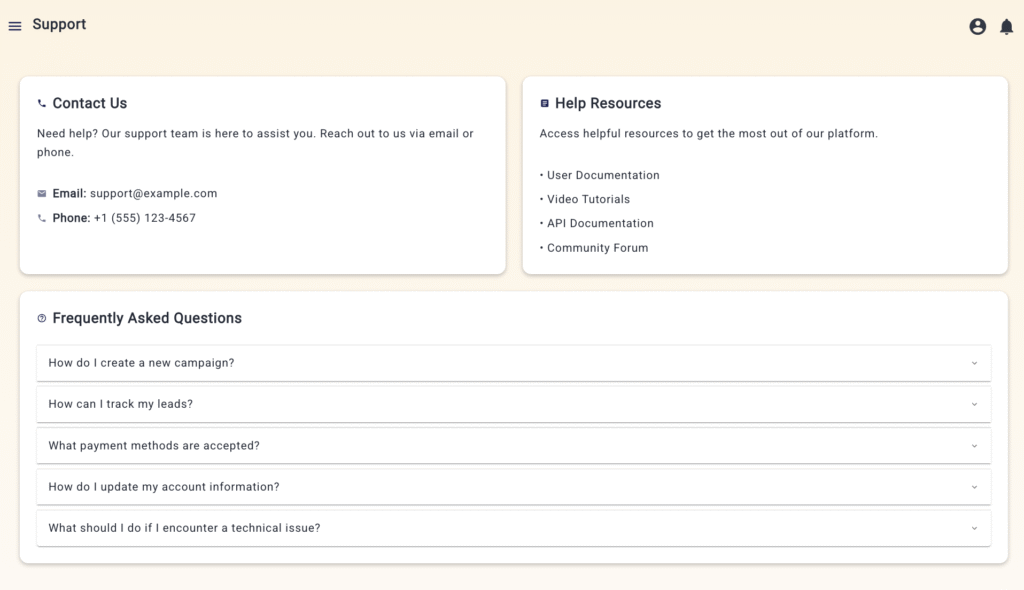
Cursor’s Support.tsx looked clean and familiar — an FAQ-style layout with contact cards, icons, and accordions. It handled the “show info” task perfectly.
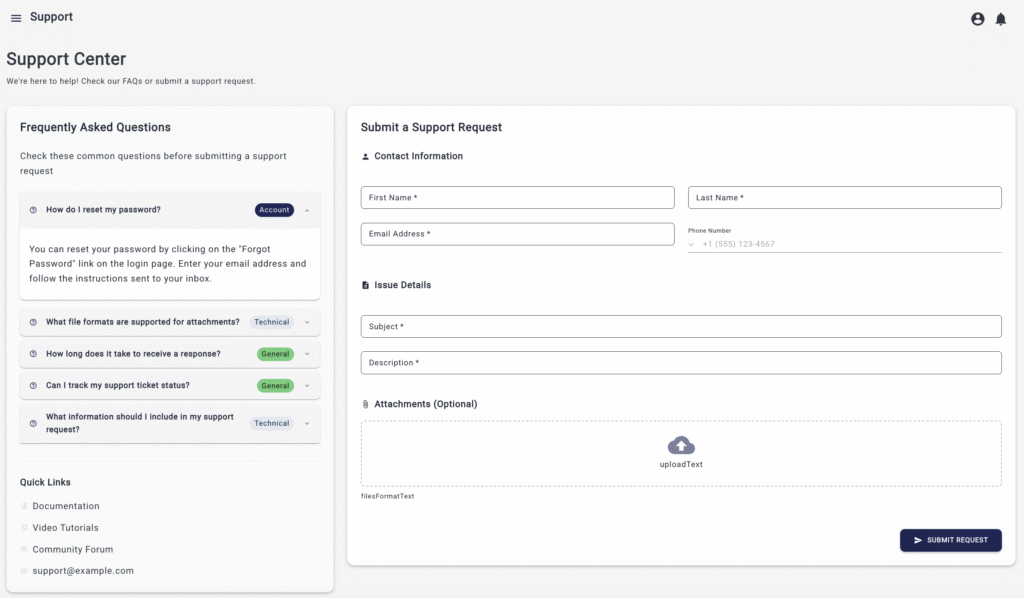
AutonomyAI’s SupportPage.tsx went another route. It built a full support workflow: validated forms, file upload, submission handling, notifications, and form reset states. Instead of telling users how to get help, it let them do it directly.
Both were correct.
One focused on presentation, the other on functionality.
It was the first clue that these two AIs weren’t competitors so much as co-workers — one writing code, the other orchestrating systems.
AutonomyAI
Cursor
Round 2: Cursor’s Honest Review
To keep things fair, we let Cursor evaluate both implementations.
The prompt:
“Please evaluate and break down which implementation is better: SupportPage.tsx or Support.tsx.”
Cursor’s own analysis was surprisingly candid:
- Functionality: AutonomyAI’s page was interactive and actionable; Cursor’s was static.
Winner: AutonomyAI. - Architecture: modular components, separate constants and types vs. one-file logic.
Winner: AutonomyAI. - UX: real-time validation, success/error states, clear layout vs. static display.
Winner: AutonomyAI. - i18n: Cursors translations were consistent, properly namespaced, and complete. AutonomyAI’s didn’t include internationalization (nothing a small follow-up request couldn’t fix).
Winner: Cursor. - Technical issues: AutonomyAI’s form had a
@ts-ignoreand missing locale references. Cursor’s simpler build was cleaner in that regard.
Winner: Cursor.
Still, the overall conclusion was clear:
“SupportPage.tsx is stronger overall.”
And yes – Cursor wrote that itself.
Round 3: Counting the Reuse
When we tallied up design system reuse, the data told the same story — AutonomyAI worked like it already knew the repo.
Summary:
- SupportPage.tsx: 67 % more design system reuse (10 vs 6 components)
- SupportPage.tsx: 40 % fewer external dependencies (4 vs 10 MUI items)
- SupportPage.tsx: Uses advanced design-system components (MDFormField, MDSnackbar, FileUploader)
- Support.tsx: Relies more on raw MUI components (Accordion, icons)
Winner: AutonomyAI – stronger design-system integration and component reuse.
Cursor did what a developer would do when coding from scratch.
AutonomyAI did what a teammate would do when they already understand how everything fits together.
Round 4: Understanding the Difference
After watching both outputs, something clicked.
These aren’t rivals. They’re solving different layers of the same problem.
- Cursor shines when you’re inside a file, mid-flow, iterating quickly. It’s your in-editor pair programmer – built for individual velocity.
- AutonomyAI shines when you need something that spans across files, patterns, and systems. It’s not trying to autocomplete your line – it’s building within your architecture. It’s for the team.
It’s the difference between a personal enhancer and a collective one.
One boosts your coding speed; the other boosts your organization’s ability to ship.
That’s why many of our customers use both.
Cursor helps them move fast in the moment.
AutonomyAI helps them keep the system coherent over time.
Together, they close the loop between productivity and production-readiness.
Round 5: AutonomyAI and Cursor – Better Together
This experiment wasn’t about beating Cursor. It was about showing how the future of AI development isn’t a one-tool story.
Gen1 tools like Cursor changed the way individuals write code.
Gen2 platforms like AutonomyAI are changing how teams build products.
Same repo. Same prompt.
Different goals – and different strengths.
So no, this isn’t “AutonomyAI vs Cursor.”
It’s “Cursor and AutonomyAI” – each doing what it’s best at.
Because in the end, the fastest way to ship isn’t one AI replacing another.
It’s getting them to work together like the rest of us do.
Impact Snapshot – Why “Better Together” Matters
When teams use Cursor alone, individual developers move faster.
When they use Cursor + AutonomyAI, entire releases move faster.
The gains show up not only in code reuse but in real delivery metrics – velocity, efficiency, and quality.
| Metric | | | Improvement |
|---|---|---|---|
| Code Reuse Efficiency | Baseline | +67% (from design-system analysis) | Higher architectural consistency |
| Cycle Time Reduction | Local per-file gains | 25–40% faster feature completion * | Shorter delivery loops |
| QA & Rework Rate | Manual validation, more fixes | Lower — validated forms & typed logic | Fewer regressions |
| Team Onboarding | Editor-only context | System-level context within days | Faster ramp-up |
| Cross-File Alignment | Developer-by-developer | Repository-wide | Stronger team cohesion |
*Estimated from internal pilot data and component-reuse ratios.
In short: Cursor alone improves how fast you code.
AutonomyAI combined with Cursor improves how fast your team ships clean code.