We hear this one a lot, and it’s fair. If Claude Code already turns your prompts into working code, and you basically live in it, what does adding the Autonomy MCP actually get you?
The bottleneck moved
Claude Code is genuinely good at writing code. So are Cursor and Codex. Two years ago that felt like the whole game. Today it’s the easy part, and the bottleneck has moved to everything around the code.
The change has to match your components and standards, not come back as a from-scratch guess you rewrite. It has to render and actually work, not just compile.
The person who asked for it, often a PM or designer who doesn’t read diffs, has to be able to see the result and sign off. And it has to land as a PR your engineers trust, not one they babysit line by line.
Claude Code, on its own, does the first part. It writes the code. That’s the start of the job, not the finish.
Watch the full MCP demo led by our CTO
Fei Studio is the part after the code
Fei Studio is built for everything that comes next. It works inside your real codebase, on your actual components and conventions.
It builds the change, renders it, checks its own work, and hands back a result someone can review on the real product before anything merges. What comes out is a pull request that already went through that loop, so what the PM wanted is what the engineer sees.
That environment is the hard thing to build, and it’s the thing Claude Code doesn’t have. Generating the code was never where teams got stuck.
So why the MCP?
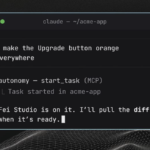
Which gets to the real version of your question. If all of that lives in Fei Studio, why add the MCP instead of just opening Fei Studio in a browser? Because you’re already in Claude Code. The MCP brings Fei to you, in the tool you already have open.
From inside Claude Code, Cursor, or Codex, you describe the change and Fei does the rest, same chat, no new tab, no second tool to learn. The environment comes to your workflow instead of pulling you out of it.
So the MCP is simply the shortest path between where you already work and everything Fei Studio does.
It also widens who can ship
There’s a quieter effect. Once Fei is reachable from the agent, more of the team can use it.
An engineer finishes a task and hands a running, reviewable result to their PM, instead of a screenshot and a Slack thread. A PM describes a change and gets it back built, without waiting on the sprint queue.
A lean team with no PM or designer turns a plain-language ask into a spec, a plan, and a built change. Same launch, more of the team in one flow.
The bottom line
Do you need the MCP if you already have Claude Code? Only if you want the part that comes after the code.
Claude Code gets you a change. The MCP gets you a change that renders, that your PM can approve, and that your engineers can merge with confidence, all without leaving the tool you’re already in.
That’s the difference between generating code and shipping it.
See it on your own codebase
Want to see it on your own codebase? Book 20 minutes and we’ll go deeper.
Tags
MCP (Model Context Protocol) AI Agents Fei Studio Claude Code