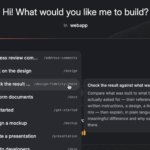
Sometimes you know exactly what you need. Sometimes Fei does.
Fei Studio now has Skills, and the idea is simple. A skill is a specific job Fei can do for you: design a screen, make mockups, review your work, or open a PR. Instead of explaining every step, you pick the skill you need and Fei does that job. Type / in Fei Studio and you’ll see the full set.
Three ways a skill kicks in
You stay in control of how much control you want.
- You choose one. You know what you need, you type /, you pick it.
- Fei suggests one. Fei sees a useful next step and offers the skill for it.
- Fei uses one itself. When the task calls for it, Fei reaches for the right skill on its own.
The Design skill
This one is a whole toolbox for shaping UI. Critique a design, polish the final details, rethink a layout, improve typography or color, simplify something cluttered, make it responsive, harden it for edge cases, or explore a completely different direction. It’s a design review, a polish pass, and a creative brainstorm, ready whenever you want one.
The Mockup skill
The Mockup skill is for when you have a few ideas and want to see them before deciding what’s worth building. It brings multiple directions to life quickly, using your app’s design system. Explore them, compare them, share them with the team, then build the one that works, with your real code components.
Why the output actually fits your product
Every skill is anchored to your codebase. Your components, your design tokens, your project context. So a mockup looks like your app, a design critique speaks your design system’s language, and a PR lands the way your engineers expect. That’s the difference between a generic AI answer and one that belongs in your product.
Try it
Open Fei Studio and type /. And check back on that menu from time to time. We keep adding new skills to Fei’s toolbox.
Want to see Skills on your own codebase? Book 20 minutes and we’ll go deeper.